- Last Updated Oct 19, 2026Published Date Oct 04, 2026
Running your first Facebook ad feels like ordering at a restaurant where the menu has no prices. You're hungry, you've no idea what it'll cost, and the waiter keeps suggesting "Boost post".
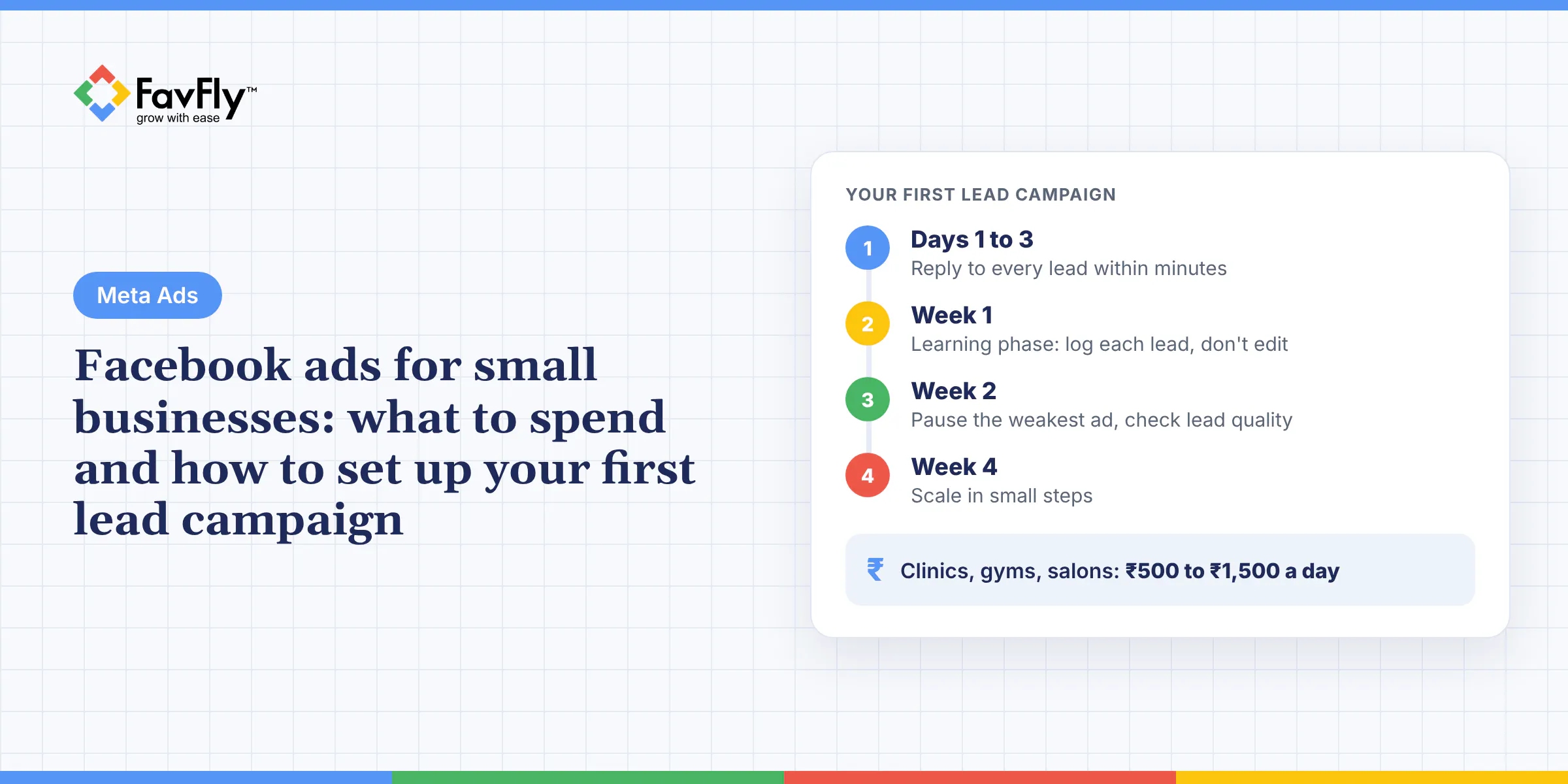
So here's the short answer on Facebook ads for small business owners in India. Plan for roughly ₹500 to ₹1,500 a day (about ₹15,000 to ₹45,000 a month, plus GST), run one Leads campaign with an instant form or WhatsApp as the destination, and give it two to four weeks before you judge it. Before you spend a single rupee, set up a Business Portfolio, a Facebook Page, a payment method and basic tracking.
Still not sure Facebook is worth it at all? Read our post on the benefits of Facebook ads first. This one assumes you've decided and want to get on with it.
Quick answer: Most local businesses in India can start with ₹500 to ₹1,500 a day, and below ₹300 a day results come slowly, because Meta's learning phase needs about 50 results in a week and small budgets often sit at "Learning limited" (keep one ad set and avoid edits). Set up the Business Portfolio, Page, INR ad account, payment method, WhatsApp link and Meta Pixel first, then build a Leads campaign in Ads Manager with instant forms or WhatsApp, a 5 to 10 km radius and one clear offer. Judge it at week 2 and week 4 on cost per lead and on how many of those leads you close.
How much should a small business spend on Facebook ads in India?
You can start with a few hundred rupees a day. In our experience, though, ₹500 to ₹1,500 a day is where most local lead campaigns in Kolkata start giving you data you can trust. Meta India bills you in rupees and adds GST to every charge, so budget for that on top.
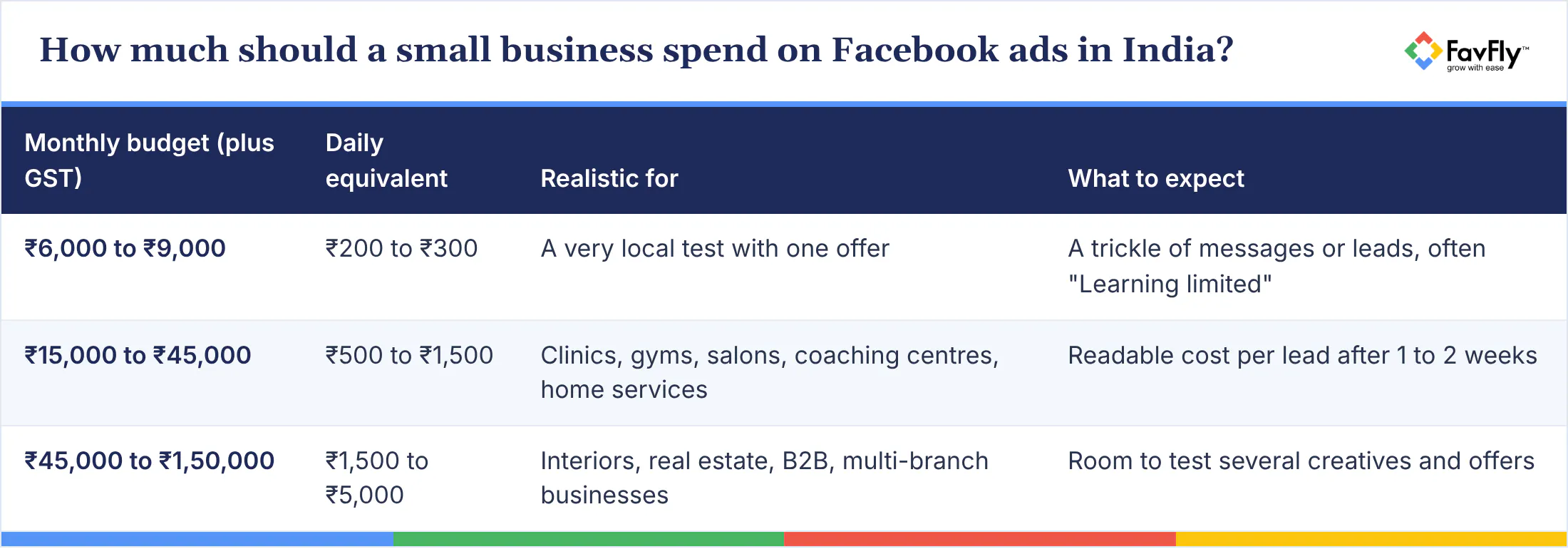
Treat these as starting ranges. Your cost per lead depends on your offer, your creative, your area and how many competitors are bidding for the same people (if three other gyms in your para are running ads this month, you'll feel it). To estimate a budget from your sales target, try our free ads budget calculator.
Why tiny budgets stall
The learning phase is the stretch after you launch or significantly edit an ad set, when Meta's delivery system is still working out who to show your ad to. According to Meta's page on the learning phase, an ad set usually exits it after about 50 results in the week after its last significant edit, and costs are usually higher while it's learning.
Do the maths. If a lead costs you ₹200, fifty leads a week means ₹10,000 a week, roughly ₹1,400 a day. On ₹300 a day you'd get about ten leads a week, and Ads Manager will likely mark the ad set "Learning limited". Meta lists low budget, small audience size and an infrequent optimization event among the usual causes.
Can a small budget still work?
Yes. Meta says being "Learning limited" is not a penalty, and a small budget can still bring leads if you give the system less to figure out. Run one campaign with one ad set and two or three ads. Keep the audience reasonably wide, such as a 7 to 10 km radius instead of 2 km. And optimize for something that happens often, like conversations or form fills.
Then leave it alone, which is harder than it sounds when it's your money on the line. Meta's list of significant edits includes any change to targeting, creative or optimization event, adding a new ad, changing bid strategy and pausing for 7 days or longer. Large budget jumps can count too.
What do you need to set up before your first Facebook ad?
A Facebook Page, a Meta Business Portfolio, an ad account in Indian rupees, a payment method, and tracking on whatever destination you use. Doing this properly first avoids a lot of the payment failures and "who owns this account?" fights we end up sorting out later. (That second kind gets surprisingly emotional.)
A Business Portfolio, earlier called Business Manager, is the account in Meta Business Suite that holds your Pages, Instagram accounts and ad accounts in one place, with control over who can access them.
Tick these off before launch:
- ☐ Facebook Page with business name, category, phone, address and hours filled in
- ☐ Business Portfolio created in Meta Business Suite, with your Page and Instagram account added
- ☐ At least two admins on the portfolio, both with two-factor authentication turned on
- ☐ Ad account with country set to India and currency set to Indian rupee (INR)
- ☐ Payment method added
- ☐ GSTIN added in Payment settings if you want to claim input tax credit
- ☐ WhatsApp Business number linked to your Page (Page Settings, then Linked accounts, then WhatsApp)
- ☐ Meta Pixel installed on your website, if you will send traffic there
- ☐ Privacy policy page on your website, since instant forms need a privacy policy link
Two of those need a word. On payment, Meta's India payment options include Visa, Mastercard and American Express cards, plus UPI and netbanking. But UPI and netbanking can only be added if you pick a manual payment method when you first set up the ad account, so decide at that moment. And on WhatsApp, please don't use your personal number. Our guide to the benefits of a WhatsApp Business account explains why.
Pixel and Conversions API, in plain words
The Meta Pixel is a piece of code on your website that tells Meta when someone visits a page or submits a form. The Conversions API sends that same kind of data from your server or CRM directly to Meta, and Meta describes it as a more reliable connection for optimization and measurement. You can read Meta's overview of the Conversions API if you're curious about the plumbing.
It matters more in 2026. Since April 2026, Meta no longer offers the "qualified leads" performance goal for new campaigns without a Conversions API integration, and existing campaigns are affected from August 2026. Your first campaign can run without it. Plan for it once leads start coming in, though.
Facebook ads for small business: your first lead campaign, step by step
To run Facebook ads for leads, open Meta Ads Manager, choose the Leads objective, pick where the lead happens (instant form, WhatsApp, calls or website), set your location, budget and placements, add your creative and form, and publish. Meta's guide to creating a lead ad in Ads Manager goes in the same order. Slower, with our notes:
- Hit + Create, pick Leads. These days Meta drops you straight into an Advantage+ leads campaign with a campaign score on the right. Don't worry, the manual options are still there.
- One daily budget, at campaign level. Pick a number you won't panic about for four weeks.
- Conversion location: instant forms, Messenger, Instagram, WhatsApp, calls or your website.
- Performance goal "Maximize number of leads" is fine for a first go.
- Pin your business on the map, choose a radius, add an age range if it matters and let Advantage+ audience handle the rest. You really don't need 20 interests.
- Advantage+ placements stay on, so you show up on Facebook and Instagram both.
- The ad itself: single image, video or carousel, two or three versions of it, and text that says the offer, the area and the price. (People in Dum Dum want to know you're not in Garia.)
- Chose forms? Ask for name and phone, then one or two qualifying questions like area or preferred time. Add your privacy policy link, and put a call or WhatsApp button on the ending screen.
- Publish, and Meta checks it against its advertising policies before anything goes out.
Forms, WhatsApp, calls or website?
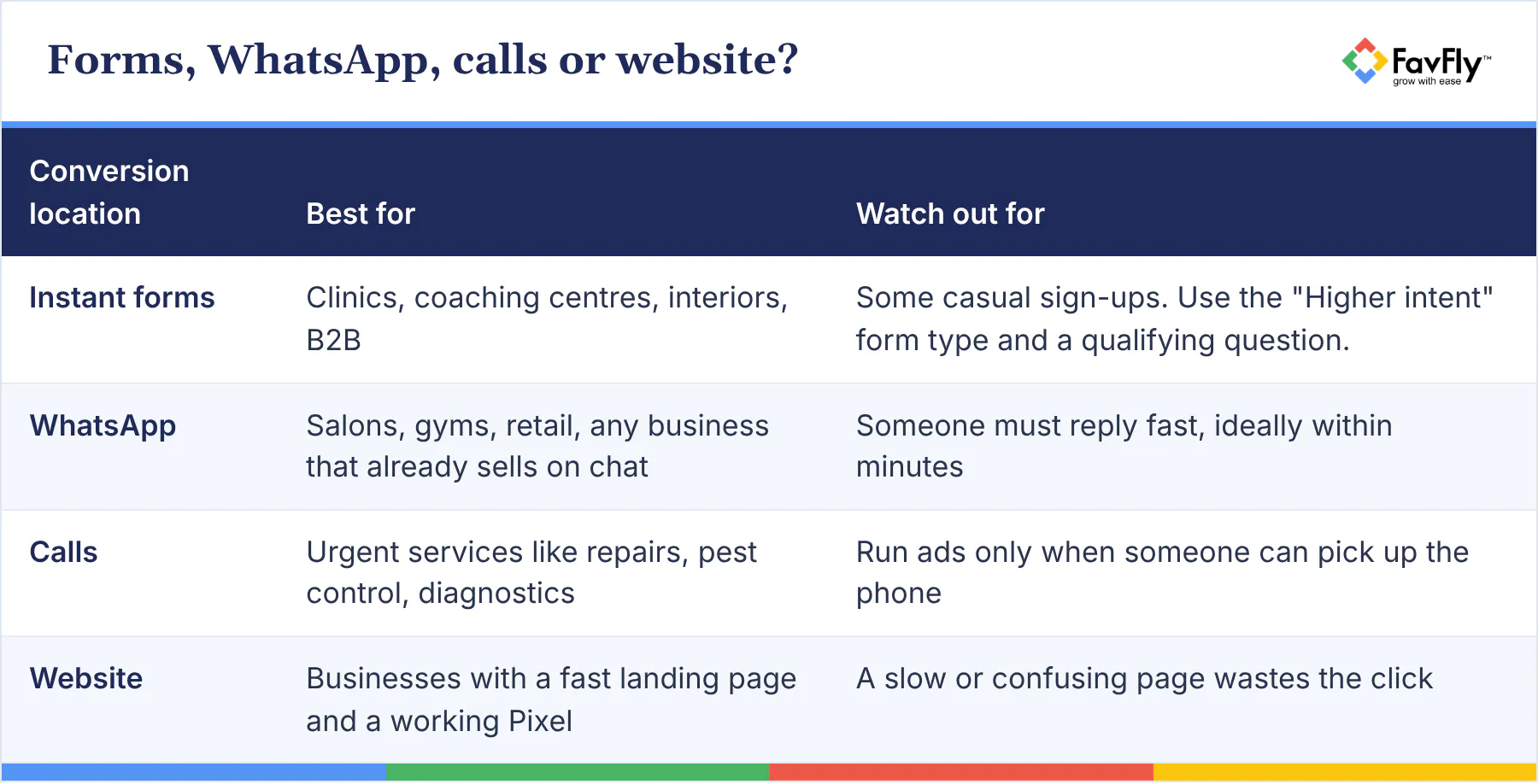
It mostly comes down to how your customers like to talk to you. Say you run a dental clinic in Behala: a form with a qualifying question will usually do the job. A salon in Gariahat, on the other hand, more or less lives on WhatsApp.
Once the campaign is live and you want better leads out of it, our Facebook lead generation tips pick up from here.
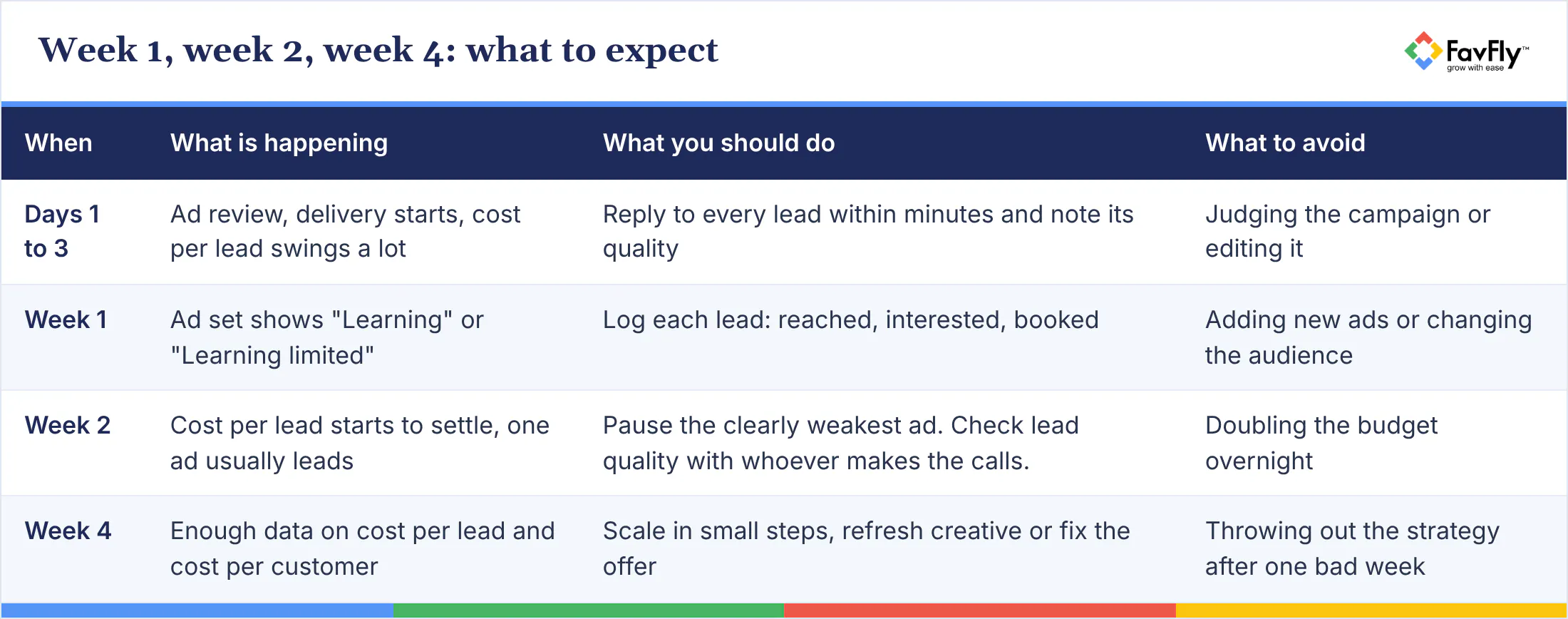
Week 1, week 2, week 4: what to expect
Costs jump around in week one, patterns get clearer by week two, and by week four you'll have enough data to make real decisions. The annoying part is that week one is when you'll be most tempted to tinker, and it's exactly when the campaign most needs to be left alone.
Real example: how The Hybreed Gym got 59 leads in 7 days
Gyms in Nagerbazar, Kolkata, have it rough. The local fitness market is crowded, and when The Hybreed Gym came to us, one rival was busy undercutting everyone on price.
So we went and looked at the other gyms first, and at who trained there. Then we sketched out the different kinds of members (a persona for each, if you like the jargon) and built the whole campaign on one offer nobody had to think twice about. A full month of membership. ₹99.
That got them 59 leads in 7 days from a Facebook campaign.
The homework mattered. But if we're being straight with you, the ₹99 month carried a lot of the weight. Give people a cheap, low-risk first step (a ₹99 trial month, a ₹299 first consultation, a free site visit) and Meta's system has something people respond to, which helps even a modest budget find leads faster.
Where most first campaigns go wrong
Most first campaigns fail for boring, fixable reasons: the wrong objective, budgets spread too thin, constant edits and slow follow-up.
The specific ones we run into most often are painfully familiar. People boost posts and call it a lead campaign. They split ₹500 a day across five ad sets, so none of them learns anything. They edit the campaign every evening after checking it at lunch (we get it, it's your money, but please stop). They run ads with no offer, just "Contact us for details". They ask only for name and phone, then get annoyed at casual leads. And they judge the whole thing by likes and comments, which tell you very little about whether anyone will pay.
We cover more of this in our posts on common Meta Ads mistakes and why your Facebook ads aren't working.
"We got leads, but nobody picks up the phone"
We hear this one a lot, and the fix usually sits on your side of the funnel. Call or WhatsApp every lead within minutes, introduce yourself by name, mention what they asked about, and try at least three times over two days. Somebody who filled your form at 9 pm and got a call the next afternoon has usually forgotten they ever did.
Frequently asked questions
How much do Facebook ads cost per day in India?
Whatever you set, plus GST on top. We'd usually tell a local business to start somewhere around ₹500 to ₹1,500 a day, so roughly ₹15,000 to ₹45,000 a month. What each lead costs you will swing with your offer, your creative, your area and who else is advertising, so give it two weeks at least before you decide it's too expensive.
Can I run Facebook ads with ₹100 or ₹200 a day?
Yes. Ads Manager will shout at you if you go below Meta's minimum, otherwise it's allowed. Just don't expect much: few results, probably stuck on "Learning limited". If that's your budget, one ad set, a decent radius, a strong offer, and patience.
How long is the Facebook ads learning phase?
There's no fixed number of days. Meta counts results: about 50 in the week after your last significant edit and the ad set is usually out. Small budget? It may never get there, hence "Learning limited". And touching targeting, creative or the optimization event, adding new ads or pausing for 7 days or more puts you back at the start.
Do I need a website to run Facebook ads?
Not for the first one. Forms, WhatsApp, Messenger and calls all work without it. The catch is that instant forms need a privacy policy link, and that normally sits on a website, which is also where the Meta Pixel would go if you want to track what people do there.
Are Facebook lead form leads good quality?
Mixed bag, because submitting one takes seconds. Switch on the "Higher intent" form type, ask about area or budget, and run an offer real buyers care about. But the thing that moves it most is boring: call every lead within minutes.
Should I run Facebook ads myself or hire an agency?
Small budget and some free evenings? Do the first one yourself, you'll learn a lot. We'd start talking to an agency once you're past ₹30,000 a month, or you need tracking done properly, or you've been at it a few months and the cost per lead still won't settle. And ask whoever you talk to (yes, us too) for case studies with real numbers before you sign anything.
Start small, stay steady
Your first Facebook campaign doesn't need to be perfect. It needs a clean setup, one offer people want, a budget you can hold for four weeks and someone who calls leads back fast. Get those right and you'll learn more in one month than from a year of boosting posts.
At FavFly, we set up and run Meta Ads for small businesses across Kolkata and beyond, and we track leads through to sales with UnifyLeads, our lead tracking tool.
Want help with this? Book a free consultation with FavFly and we'll review your setup, offer and budget with you. Or see how our Meta Ads service works.
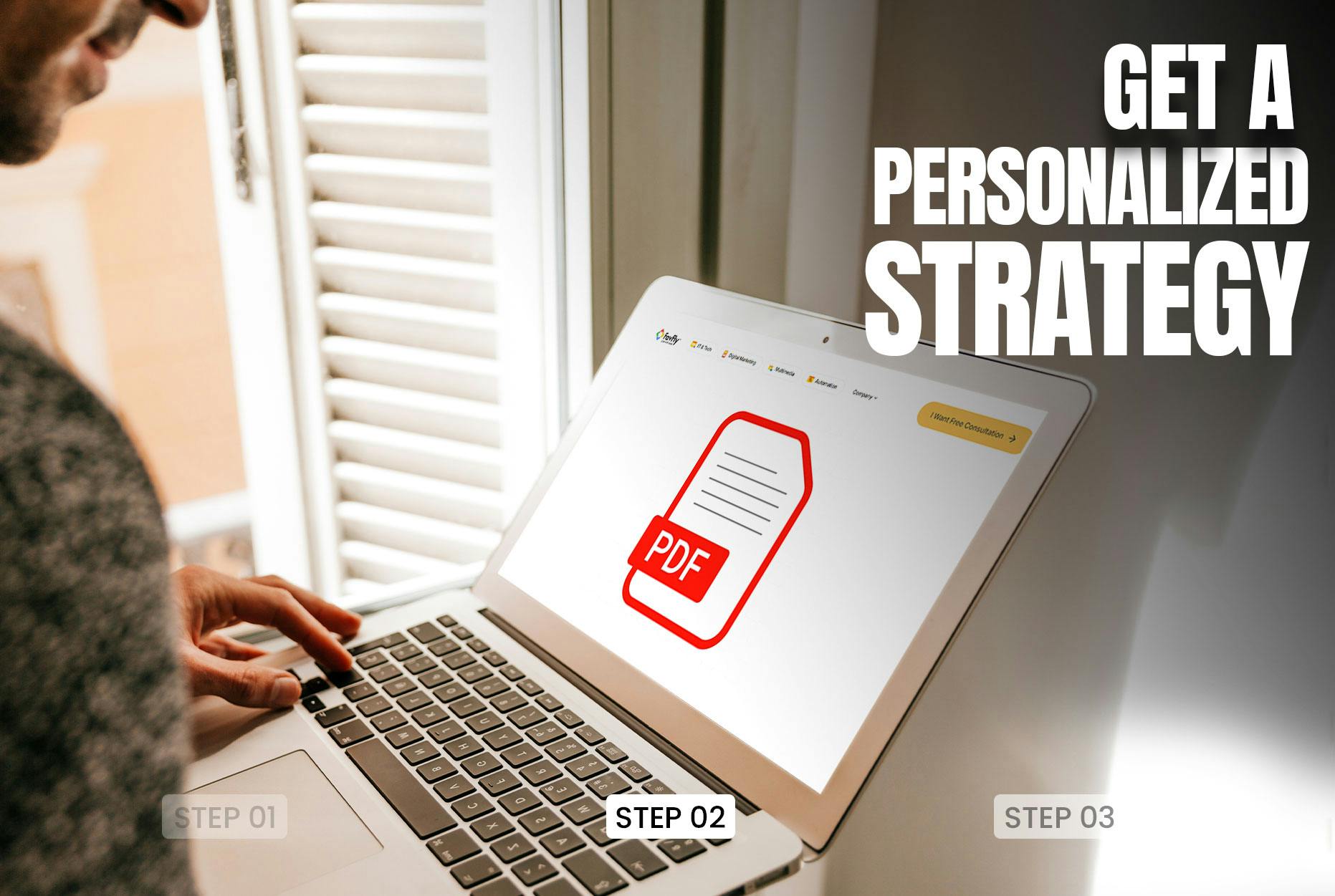
Start Growing in Just 3 Simple Steps
We assess your goals, craft a tailored strategy, and finally implement it so you can confidently grow your business.
Book a free consultation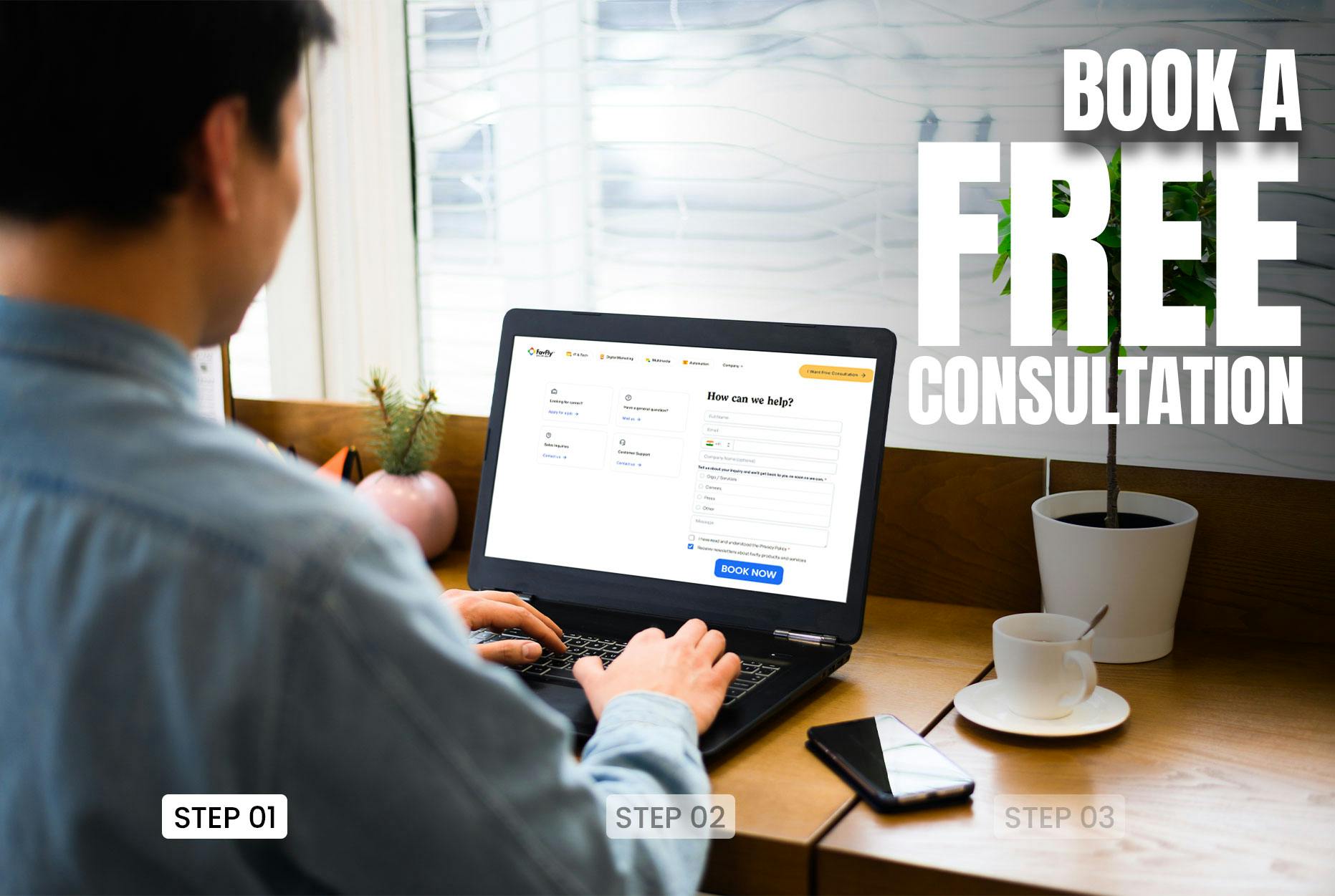


Join Our WhatsApp Channel
Join our privacy friendly whatsapp channel and stay up to date with the latest news, updates, and exclusive offers. Join our community today!
Get Free Access
Solutions ❇️
Popular Gigs 📈
Tools 🛠️
- Ads Budget Calculator
- UnifyleadsSoon
- ShareUsReviewSoon
- BrandItSoon
- GrowSoon
FavFly Solutions for Your Digital Growth:
SEO Services in Kolkata | Local SEO Company in Kolkata | Digital Marketing Company in Kolkata | Social Media Marketing Services in Kolkata | WebStudio Website Development | UGC Reels Creation Services | Google My Business for Gynecologists | Google My Business for Restaurants | Google My Business Guide | Google My Business for Dentists | Google My Business for Interior Designers | Google My Business for Doctors | How Google My Business Profile Works
* About Us : At FavFly, we redefine digital marketing by focusing on what truly matters: your growth. We don’t just offer services like SEO, SMM, and website development – we become an integral part of your success story, providing strategic guidance and innovative solutions that empower your business to reach new heights.