- Last Updated Oct 19, 2026Published Date Oct 16, 2026
Picture a new salesman whose boss says "shabash" every time someone takes a brochure from him. Within a week he's handing brochures to everyone on the footpath, and he still has no clue who bought anything.
Meta's ad system learns the same way. It goes after whatever event you send it, so if the only signal it ever gets is "someone filled a form", it hunts for more form fillers (including the ones who never answer your call). The Meta Conversions API, running alongside the Meta Pixel, is how you tell Meta about the events you care about, like a qualified lead, a booked site visit or a sale. Then it can start looking for people who buy.
The setup, squeezed into a line: install the Pixel, connect the Conversions API from Events Manager or a plugin, give duplicate events a shared event ID, send hashed contact details for matching, and push your CRM lead stages back to Meta.
Quick answer: Meta finds more of whatever you call a conversion, so send it qualified leads and sales as well as raw form fills. Run the Meta Pixel (which reports from the visitor's browser) and the Conversions API (which reports from your server or CRM, so fewer events go missing) together, give matching events the same event_name and event_id, and send hashed email and phone with the 91 country code to raise your Event Match Quality. If you use Meta Instant Forms and get 200+ leads a month, connect your CRM so Meta can optimise for Conversion Leads.
Why your tracking decides how good your Meta leads are
Meta shows your ad to the people it predicts will complete the conversion event you picked. That event is its entire idea of success. Send it a weak event and you get weak leads, and nobody at Meta will ring to warn you.
"We get 100 leads a week and nobody picks up"
We hear this from Kolkata business owners more than any other complaint. The campaign is optimised for the Lead event, the cost per lead looks lovely in Ads Manager, and the sales team spends the whole afternoon dialling numbers that ring out.
Meta did what it was asked and found cheap form fillers. Nobody told it that only a handful ever took a call.
Say you run an interior design studio in New Town and what you really want is a booked site visit. If Meta only hears about form submissions, it chases form submitters. But if it also hears "this lead qualified" and "this one booked a site visit", it can start favouring people who look like your real customers. (If leads still never convert after that, go through our list of reasons Facebook ads stop working.)
Meta Pixel vs Conversions API: what's the difference?
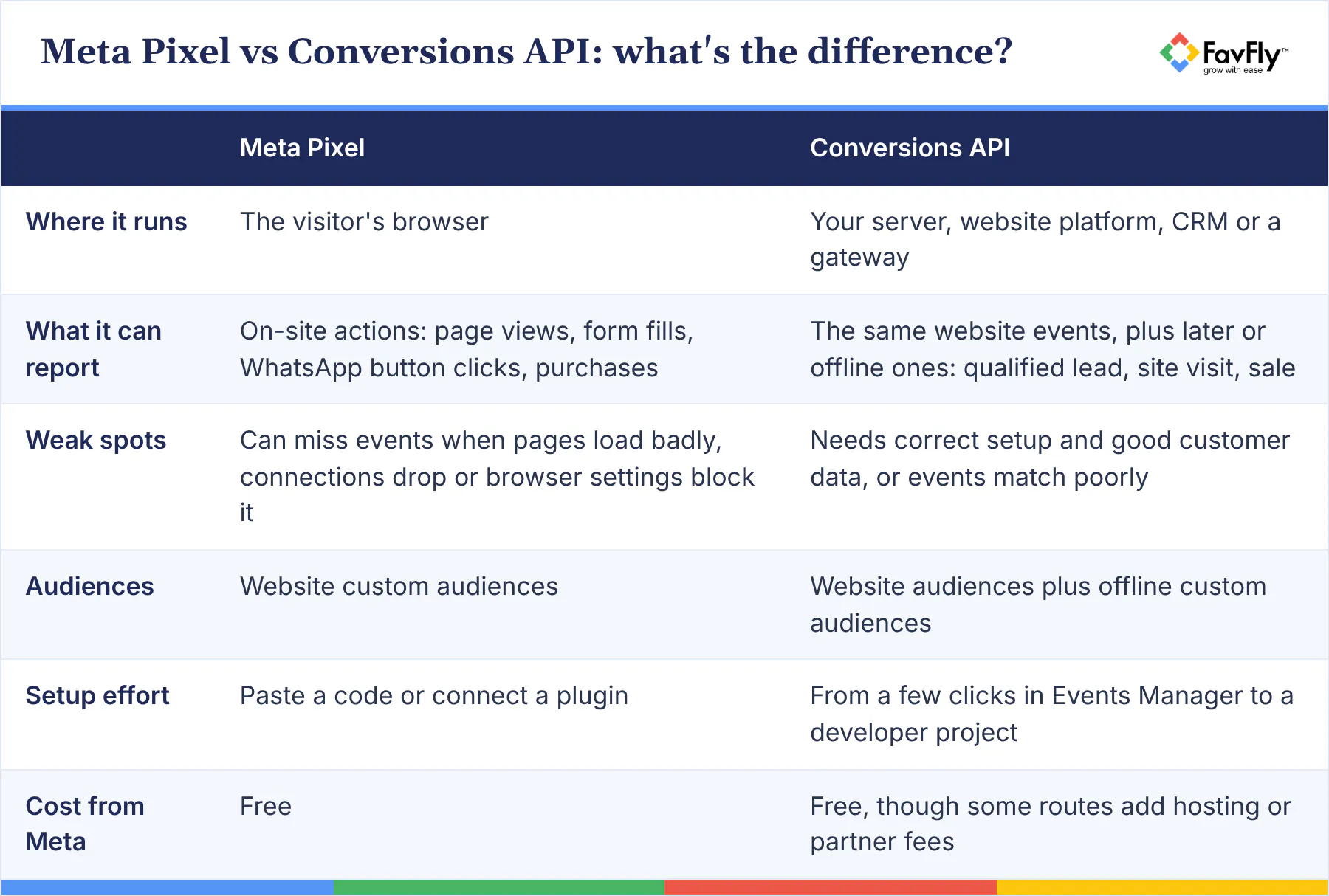
The Meta Pixel (plenty of people still call it the Facebook Pixel) is a bit of JavaScript on your website that reports page views, form submissions, purchases and other actions from the visitor's browser. The Conversions API, or CAPI, is a server-to-server connection. It sends events to Meta from your server, your website platform, an app or your CRM.
You don't have to choose. Meta's Conversions API best practices tell you to run both and send the same events through each, which Meta calls a "redundant event setup". The server copy picks up website events the Pixel loses to connection or page loading errors, and it can carry events that happen later or offline.
Do I still need the Pixel if I set up CAPI?
Yes, and people get this one wrong a lot. The Pixel sets the first-party _fbp and _fbc cookies your server events use for matching, so pulling it out weakens your server data. Use the same Pixel ID for both.
Setting up the Meta Conversions API: five routes for a small business
There are five practical ways in, and the right one depends on your website platform, where your leads land and how much developer help you have. Most small businesses start with the first or second.
The one-click option in Events Manager
If your Pixel is already live, Meta lets you switch on the Conversions API for website events inside Events Manager with "no code, configuration, or setup fees". Meta calls this Conversions API with Meta. The catch is that it only covers website events, so CRM and offline events need one of the other routes.
Plugins and partner integrations
On WordPress, there's Meta's official "Meta pixel for WordPress" plugin, or "Meta for WooCommerce" if you sell online. Shopify stores use the Facebook & Instagram sales channel, and you'll want to set data sharing to Enhanced or Maximum there, because the Standard level uses only the Pixel. It's an easy setting to miss. For CRMs and form tools, look at the partner integrations listed in Events Manager; Meta names Zapier as one way to send CRM events.
Conversions API Gateway
The Conversions API Gateway is a self-serve option in Events Manager. You set up a server instance in your own cloud account (it runs on AWS or Google Cloud), and it sends Pixel and server events together, generating the event_id for deduplication by itself. It suits custom-coded sites and businesses running several domains.
Server-side Google Tag Manager, or going direct
Already running Google Analytics 4 through Google Tag Manager? Meta maintains a Conversions API tag for a GTM server container on Google Cloud Platform or another provider, which is handy if your team is comfortable in GTM.
The last route is a direct integration, where your developer sends events straight from your backend or CRM. Full control, most work. For CRM events, Meta estimates under a day with a partner integration and 3 to 4 weeks for a custom build, so we'd look hard at the partner list before anyone starts writing code.
Counting each lead once, and matching it to a real person
Two details decide whether your Conversions API setup helps Meta or confuses it: duplicates and matching.
How do I stop Meta counting the same lead twice?
Give the browser copy and the server copy of an event the same event name and the same event ID. In the Pixel code that's eventID, and in the API call it's event_id. Meta's deduplication guide says events only get deduplicated if they arrive within 48 hours of each other.
The easiest way is to create a unique reference the moment the form is submitted (your enquiry number works) and pass it to both. There's a fallback using fbp or external_id, but Meta notes it generally only works when the browser event arrives first, so we wouldn't lean on it.
Quick smell test: if Ads Manager shows close to double the leads your CRM shows, deduplication is probably broken. (Usually spotted right after someone has announced the ads are doing amazingly.)
Event Match Quality, and what you should send
Event Match Quality (EMQ) is a score out of 10 in Events Manager that rates how well the customer information on your server events matches Meta accounts. Meta can only use matched events for attribution and ad delivery optimisation, and unmatched ones count for basic measurement only. For now, EMQ covers web events.
The highest weighted parameters are email, phone, IP address, user agent, fbp, fbc, first name and last name, and it also asks for external_id and event_id on every event. For Indian businesses the phone number needs a little care. Meta asks you to remove symbols and leading zeros and always include the country code, so 098765 43210 becomes 919876543210 before hashing.
Email (lowercase, no spaces), phone and names get hashed with SHA-256, while IP address, user agent, fbp and fbc are never hashed, and most plugins and Meta's Business SDK do the hashing for you anyway. One thing we'd push for: make phone a required field. In our experience, it's the detail Indian leads share most readily.
How do you send CRM lead stages back to Meta?
You use Meta's Conversions API for CRM integration. Every time a lead's stage changes in your CRM (Contacted, Qualified, Site visit booked, Won), the CRM sends that change to Meta with the lead ID, and the Conversion Leads performance goal then finds people likely to reach the stage you care about.
Meta's CRM integration guide lists what makes a business a good fit:
- Leads come from Facebook or Instagram Lead Ads (Instant Forms)
- Your CRM stores the 15 to 17 digit Meta lead ID (or you send click ID, phone or email)
- You generate at least 200 leads a month
- You upload data at least once a day
- The stage you optimise for happens within 28 days of the lead
- That stage converts between 1% and 40% of leads
Send every stage as it changes, starting with the raw lead. Meta wants at least two stages and recommends three. In Events Manager you then put the stages in order as your sales funnel and pick the earliest one that signals a good lead, and Meta optimises for that stage and everything below it.
People skip the 1% to 40% rule, and then wonder why nothing improves. If only 0.5% of your leads become sales, "Won" is too rare for Meta to train on, so choose "Qualified" or "Site visit booked".
Getting leads from a website form instead? You can still send later stages as offline events for reporting and offline custom audiences. Meta's FAQ also mentions Website Forms for this integration, so check what Events Manager offers on your account.
Privacy basics: hashing, consent and India's DPDP Act
You can share customer data with Meta lawfully, but doing it right is on you: hash contact details, collect consent and keep sensitive information out of your events.
The Digital Personal Data Protection Act, 2023 is India's data protection law. Its Rules were notified on 14 November 2025 with an 18-month window for phased compliance, according to the Government of India's PIB release. Under the Rules, every Data Fiduciary (the business deciding how personal data is used, which here means you) must give a separate, clear consent notice stating the specific purpose, and people can withdraw consent any time.
Put a consent line on every form, something like "I agree to be contacted by [Business] and for my details to be used to measure and improve our ads." Mention the Meta Pixel and Conversions API in your privacy policy. And keep health or financial details out of event names. Say you run a dental clinic in Behala: you'd send "Appointment booked", never the condition treated.
This is general guidance, so do check your setup with your lawyer.
Your Meta Pixel and Conversions API setup checklist
Work through these in order. With a plugin, steps 1 to 7 often take a day. The CRM steps take a few weeks (plus at least one long meeting where sales and marketing agree on what "qualified" means).
- List your events: Lead, Contact (WhatsApp or call clicks), Schedule and CRM stages.
- Confirm one Pixel for the business in Events Manager, used for browser and server events.
- Install the Pixel (plugin, GTM or code) and turn on automatic advanced matching.
- Check events with the Meta Pixel Helper extension and the Test Events tab.
- Connect the Conversions API through the route that fits your site.
- Add a shared event_id to browser and server copies, then confirm in Events Manager that they deduplicate.
- Send hashed email, phone (with 91), name and external_id. Check EMQ after a few days.
- Store the Meta lead ID in your CRM and agree on clear stage names with your sales team.
- Send stage updates to Meta at least daily and set up your sales funnel in Events Manager.
- Add consent text, update your privacy policy and compare CRM counts with Ads Manager monthly.
Once tracking is clean, cost per qualified lead gets easy to measure, and our guides to measuring Meta ads ROI and the Meta Ads metrics that matter pick up from there.
How we track lead to sale at FavFly
At FavFly, we set up the Pixel and Conversions API before we scale any Meta Ads campaign. Spend budget on the wrong signal and you're paying Meta to learn the wrong lesson.
Every lead lands in UnifyLeads, our lead capture, follow-up and attribution tool (it's part of our Lead10X setup), whether it came in through an Instant Form, a website form or a WhatsApp chat. The team follows up from there and updates each lead's stage until it closes or drops. And because source and stage sit in one place, we can see which campaign and ad produced each sale, and which stage Meta should optimise for. Clean website events also make your audiences sharper for retargeting on Meta.
For a sense of what good optimisation can do, take Xpert Now, where our Meta Ads work delivered 1,000+ onboardings and an 88% drop in CPA. The goal was onboardings, so that's what we judged the campaign on. We don't credit tracking alone, mind you; the offer, landing page, creatives and targeting all went into it.
Frequently asked questions
Is the Meta Conversions API free?
Yes. Meta doesn't charge for it, and the one-click option in Events Manager has no setup fees. The Conversions API Gateway runs on your own cloud account, though, so you pay for hosting, and Zapier or paid plugins charge their own fees.
Do I need a developer to set up the Conversions API?
Not always. With a live Pixel, the one-click option and the Shopify and WordPress plugins cover website events without code. For CRM lead stages, offline sales, custom events, or a custom-built site no plugin fits, you'll want a developer or a partner tool.
What is the difference between the Facebook Pixel and the Meta Pixel?
There isn't one. Facebook's parent company renamed itself Meta in 2021 and the Facebook Pixel became the Meta Pixel, with the same code, Events Manager and setup steps, so older guides that say "Facebook Pixel" still apply.
Can I use the Conversions API without a website?
Yes. If your leads come from Instant Forms on Facebook or Instagram, your CRM can send lead stages through the Conversions API for CRM integration with no website involved. Meta also documents a Conversions API for business messaging events.
What is a good Event Match Quality score?
Meta rates EMQ out of 10, and higher is better because only matched events can be used for attribution and optimisation. Don't obsess over the number itself. Look at which customer details each event is missing and fill those gaps first. Hashed email and phone with the country code, plus fbp, fbc, IP address and user agent, usually lift the score the most.
How long does it take to see better lead quality after sending CRM data?
Give it at least a month. Meta estimates roughly 3 to 4 weeks to value for the CRM integration, and its FAQ mentions a training period of 1 to 2 months after your funnel is confirmed. You can run Conversion Leads campaigns meanwhile; the full effect just comes after training.
Where to start this week
If you do one thing this week, switch on the one-click Conversions API in Events Manager. It's a few clicks and Meta doesn't charge for it. Add CRM stages next month, once your sales team is updating them properly.
Your ads only get as good as the signal you feed them. For a lot of businesses that signal is still "somebody typed in a phone number", and Meta can do far more with a lead marked qualified or a site visit that really happened.
Want help setting up tracking that follows every lead to the sale? Book a free consultation with FavFly or see how our Meta Ads service works.
Start Growing in Just 3 Simple Steps
We assess your goals, craft a tailored strategy, and finally implement it so you can confidently grow your business.
Book a free consultation

Join Our WhatsApp Channel
Join our privacy friendly whatsapp channel and stay up to date with the latest news, updates, and exclusive offers. Join our community today!
Get Free Access
Solutions ❇️
Popular Gigs 📈
Tools 🛠️
- Ads Budget Calculator
- UnifyleadsSoon
- ShareUsReviewSoon
- BrandItSoon
- GrowSoon
FavFly Solutions for Your Digital Growth:
SEO Services in Kolkata | Local SEO Company in Kolkata | Digital Marketing Company in Kolkata | Social Media Marketing Services in Kolkata | WebStudio Website Development | UGC Reels Creation Services | Google My Business for Gynecologists | Google My Business for Restaurants | Google My Business Guide | Google My Business for Dentists | Google My Business for Interior Designers | Google My Business for Doctors | How Google My Business Profile Works
* About Us : At FavFly, we redefine digital marketing by focusing on what truly matters: your growth. We don’t just offer services like SEO, SMM, and website development – we become an integral part of your success story, providing strategic guidance and innovative solutions that empower your business to reach new heights.