- Last Updated Oct 19, 2026Published Date Oct 11, 2026
You post a lovely Reel of a bridal makeover from your salon. It gets 40 likes (half of them from your cousins) and the phone stays quiet.
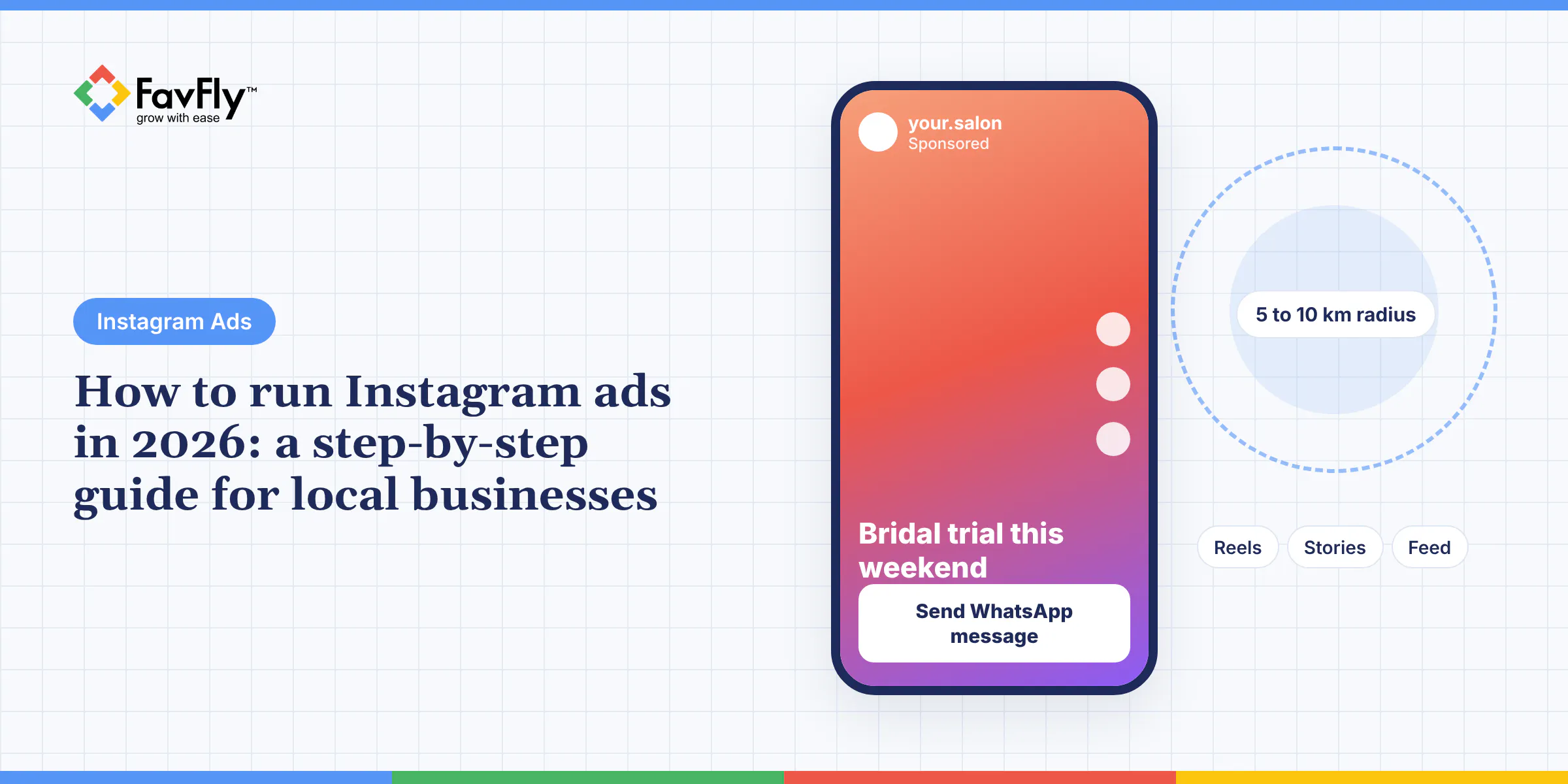
Learning how to run Instagram ads properly is what changes that. In short, you connect your Instagram professional account to a Meta Business Portfolio, then build the campaign in Meta Ads Manager with the Leads or Engagement objective, a tight radius around your business, Reels and Stories placements, and a daily budget you can hold steady for at least two weeks.
The rest is that sentence slowed down, with the settings and rupee figures we use for local clients at FavFly.
Quick answer: Switch to an Instagram professional account, add it to a Meta Business Portfolio with an ad account in INR, and build the campaign in Meta Ads Manager using Leads (for forms, WhatsApp or calls) or Engagement (for Instagram DMs). Target a 5 to 10 km radius with Advantage+ placements on, so Reels, Stories and Feed are covered, and run a vertical 9:16 Reel with a hook in the first 3 seconds and one clear offer. Start around ₹500 to ₹1,000 a day plus GST, leave it alone for 7 days, then judge it on cost per lead.
Boost the post, or open Ads Manager?
Boost from the Instagram app when a post is already doing well and you just want more people to see it. If you want leads, WhatsApp chats or calls, go to Meta Ads Manager, because that's where you get every objective, detailed location control, lead forms and proper reporting.
Boosting is easy, and that's the appeal. Tap Boost under a post or Reel, set a goal, an audience, a daily budget and a duration, and you're done. Say you run a sweet shop in Gariahat with a festive offer, or a café near Park Street with a new menu, and all you want is to get seen. A boost is plenty for that.
Two rules catch people out, though. Per Instagram's help page on boosting Reels, a boosted Reel has to be 90 seconds or less, full-screen 9:16 and free of licensed music (so the film song you put under your Reel may be a problem). And boosting from the iOS app adds an Apple service fee, which you avoid by boosting from instagram.com instead.
For a clinic or a coaching centre, a boost runs out of road fast. You can't use instant forms with screening questions, you can't make WhatsApp the destination, and you get no exclusions and no conversion tracking. We've put the two side by side in our post on boosted posts vs Meta Ads if you want the long version.
What do you need before you run Instagram ads?
An Instagram professional account, a Facebook Page, a Meta Business Portfolio and an ad account with a working payment method. Want WhatsApp leads? Then a WhatsApp Business number linked to your Page as well.
Business Portfolio, by the way, is just Meta's new name for Business Manager, the thing inside Meta Business Suite where your Pages, Instagram accounts and ad accounts all live together.
We'd do this bit as a checklist, in order, with a cup of tea:
- In the Instagram app, go to Settings and switch to a professional account (Business or Creator).
- Make a Facebook Page, or clean up the one you've got, so the name, phone and address match your Instagram bio.
- Set up a Business Portfolio in Meta Business Suite and put the Page in it.
- Add your Instagram account to the portfolio. Meta's guide to adding an Instagram account to a business portfolio gives the path: Settings, then Instagram accounts under Accounts, then Add.
- Create an ad account in Indian rupees with your business location set to India. Add a card, or choose UPI or netbanking when you first set up the account, since manual payment methods can only be added at that stage. GST is added to your ad charges.
- Link WhatsApp to your Page under Page Settings, then Linked accounts, then WhatsApp.
- Install the Meta Pixel on your website if you plan to send people there.
Step 4 is where the drama usually happens. Each Instagram account can belong to only one business portfolio, so if a former agency or a freelancer "owns" yours, sort that out before you do anything else. Sometimes it's a polite phone call. Sometimes it's three.
And don't skip step 6. Our guide to the benefits of a WhatsApp Business account explains why it's worth doing before your first ad goes live.
How to run Instagram ads in Meta Ads Manager, step by step
In Ads Manager you click + Create, choose an objective, set budget, audience and placements at the ad set level, then add your Instagram identity, creative and destination at the ad level and publish. Meta's own walkthrough for creating Instagram ads in Ads Manager goes in the same order.
One thing about the 2026 screens. Meta is rolling out a "recommended setup" with Advantage+ switched on by default and a campaign score on the right, so what you see may not match older YouTube tutorials. The manual options are still there if you look.
Objective and conversion location
Click + Create and you'll get six objectives: Awareness, Traffic, Engagement, Leads, App promotion and Sales. For most local businesses that want enquiries, start with Leads.
Next comes the conversion location, which is Meta's term for where the enquiry happens. Under Leads you can pick instant forms, Messenger, Instagram (an automated question-and-answer flow in DMs), WhatsApp, calls or your website. Go with whatever your customers already use. In Kolkata that's usually WhatsApp, because why fill a form when you can just type "price?" on chat.
Draw a small circle
Say you run a physiotherapy clinic in Salt Lake. Drop a pin on the clinic and set a radius of 5 to 10 km. That covers Salt Lake, New Town and Lake Town, and it stops you paying to reach people in Behala or Garia who will never travel that far for a 30-minute session.
Set age and language if they matter. Past that, Meta's Advantage+ audience can find people inside the circle for you, and Meta reports a 9.7% lower cost per result with it on the Traffic, Engagement and Leads objectives. Its location signals aren't perfect, though, so a few leads from outside your radius are normal.
Placements
Leave Advantage+ placements on. Meta recommends it, it lets your ad run across Instagram Reels, Stories, Feed and Explore plus Facebook, and adding placements doesn't raise the cost of your ad. If you truly want Instagram only, open Show more settings in the placements section and select Instagram under Platforms. We keep Advantage+ placements on for the first week of a lead campaign, then check the placement breakdown.
Budget, then the ad itself
Pick a daily budget and a start date. Skip the end date unless it's a time-bound offer (a Puja discount, say). The rupee ranges are further down.
Then build the ad. Select your Facebook Page and Instagram account as the identity, upload a vertical video or image, write the primary text, choose a call-to-action button such as Send WhatsApp message or Sign up, and set up your instant form or message template. Two Instagram quirks from Meta's help pages: lead ads only appear in the Instagram mobile app (not on desktop), and Instagram doesn't show store locator or appointment request questions in instant forms.
Publish
Preview it in Reels, Stories and Feed, then click Publish. Meta reviews the ad against its advertising policies, and it starts delivering once approved. After that comes the genuinely hard part, which is keeping your hands off it.
Which Instagram ad objective should you choose?
Leads if you want names and phone numbers. Engagement if you want DMs or WhatsApp chats. Traffic only if your website does a good job of converting visitors, and in our experience a lot of small business websites don't. These are the six objectives Meta offers in Ads Manager in 2026:
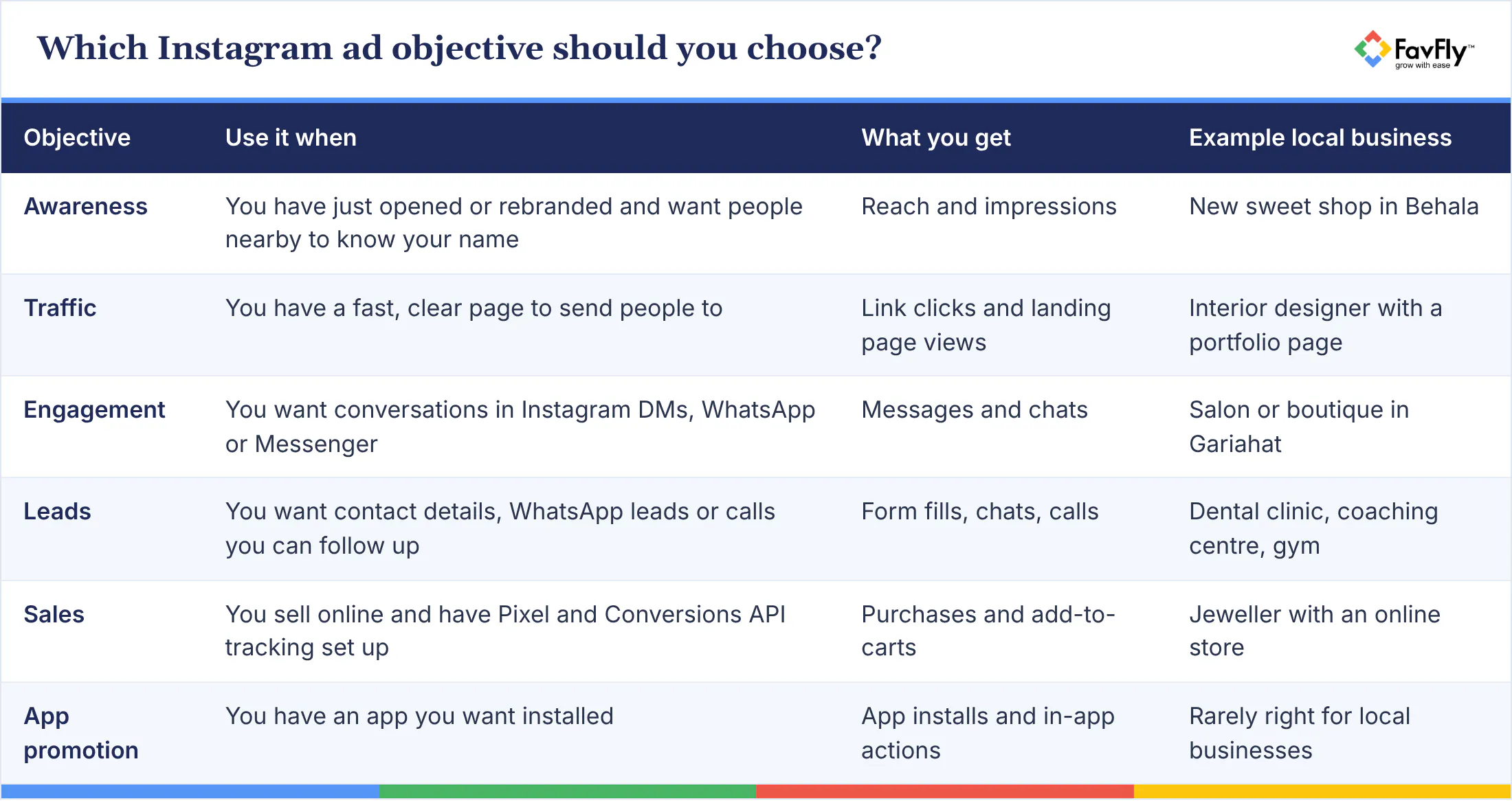
We see this one every month. Someone picks Traffic because the clicks look cheap, then can't work out why the phone never rings. Clicks are what they paid for! If your goal is calls, choose an objective that's built to get you calls.
What kind of Reel works for a local business?
Vertical video, nearly every time. A 15 to 30 second Reel shot on a phone, with a real person speaking, captions on screen and the offer stated in the first 3 seconds, usually beats a polished poster for a local business. (Designers hate hearing this.)
Our breakdown of which creatives work best on Facebook vs Instagram covers formats in detail. For a local business, a few extras help a lot. Show the place: a shot of your clinic's signboard, or the lane next to a landmark everyone knows, tells people you're nearby. Say the area out loud, something like "Salt Lake Sector 1, two minutes from City Centre." Put the price or offer on screen, because "First consultation ₹299" gets more replies than "Book now". And use your own customers or staff.
That last one is UGC (user-generated content), which means short, unpolished videos of real people using your service. It feels like a tip from a friend, and it doesn't need a big shoot. For So Ham Pranic Healing, our team shot 50 UGC reels in 3 hours. If you'd rather not be the one holding the phone, that's what our UGC reels service is for.
Okay, but how much do Instagram ads cost in India?
There's no fixed price. You set the budget, Meta runs an auction for each impression, and GST is added to what you spend. In our experience, a sensible starting budget for a local business in Kolkata is ₹500 to ₹1,000 a day, which is roughly ₹15,000 to ₹30,000 a month before GST.
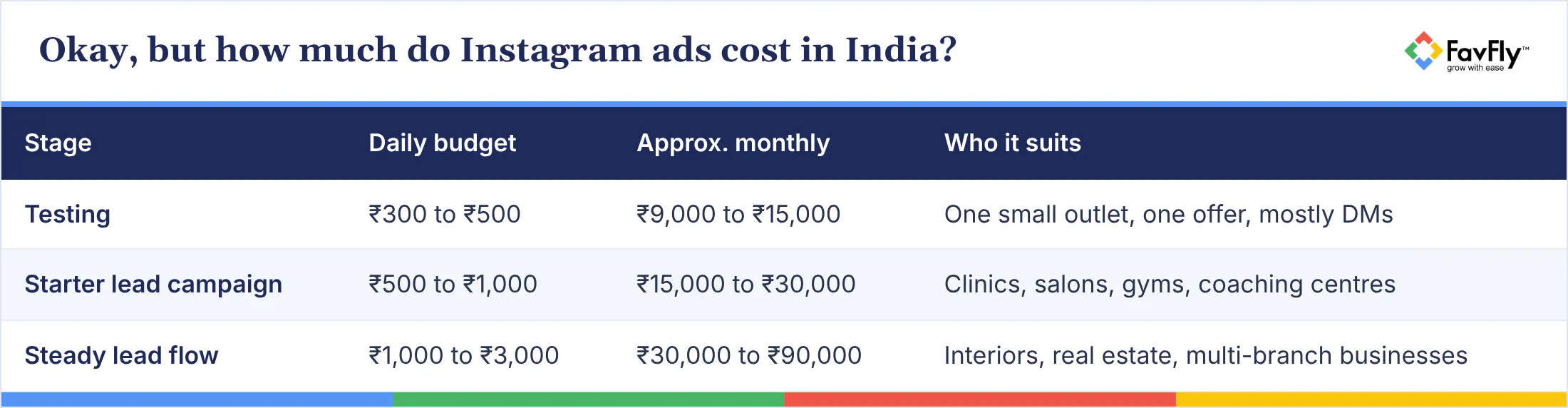
Treat these as starting ranges. Your offer, creative and competition decide what a lead really costs.
Why small budgets get stuck in "learning"
Meta says an ad set usually exits the learning phase after about 50 results in the week after its last significant edit. So do the maths. If a lead costs you ₹250, fifty leads a week means ₹12,500 a week, about ₹1,800 a day.
Most local businesses spend less than that, which means the ad set may show "Learning limited" for a while. That's fine. Keep one ad set, stop editing it daily, and judge cost per lead after 7 days. If you want to work out what you can afford, our free ads budget calculator does the arithmetic.
So how do you know it's working?
Track cost per lead (or cost per conversation), how many leads turn into calls or visits, and how many become paying customers. Likes don't pay rent.
"We get leads, but are they any good?"
In Ads Manager, add the Results, Cost per result, Frequency and Last significant edit columns. Then keep a simple sheet, or a lead tracker like our UnifyLeads, with every lead's name, the date, whether you reached them and whether they bought. It's dull work, we know. Our guide to Meta Ads metrics explains which numbers to watch and which to ignore.
Your own "good" number
Say a new patient is worth ₹3,000 to your dental clinic in Behala, and 1 in 5 leads books an appointment. Then each lead is worth about ₹600 to you, and any cost per lead below that is profitable.
Call leads within minutes, too. A form filled at 9 pm and called back the next afternoon has usually gone cold, and no amount of ad tweaking fixes that.
How we run Instagram ads at FavFly
At FavFly, we're a Meta Business Partner based in Kolkata, and a lot of our Meta Ads work is for local businesses that need enquiries from the few kilometres around them. Our process isn't clever. We fix the account setup, pick one objective and one offer, shoot vertical creative, track every lead to a sale, then scale what works.
Two from our portfolio: Chobir Kotha Photography got 60+ bookings from Meta Ads, and you can see our Meta Ads work for Lakmé Academy Salt Lake there too. If you'd rather hand the whole thing over, our Meta Ads service covers setup, creative, tracking and monthly optimization.
Frequently asked questions
How much does it cost to run Instagram ads in India?
Whatever you decide, plus GST, because there's no fixed price per ad. For a local business we'd start at ₹500 to ₹1,000 a day, so ₹15,000 to ₹30,000 a month. What a lead costs after that? Depends on your offer, creative, location and who you're up against. Wait a week before you decide.
Can I run Instagram ads without a Facebook Page?
For boosting from the app, yes, Instagram lets you keep the two separate. For anything serious, just make the Page. WhatsApp ads go through it, and you'll find forms, billing and the rest much less painful in a Business Portfolio with both accounts linked.
How long do Instagram ads take to start working?
The ad goes out as soon as Meta approves it. Whether it's working is a different question, and that only gets clear after learning (roughly 50 results in the week after your last significant edit, per Meta). So: 7 days, hands off, then look at cost per lead and lead quality. Day one numbers mean very little.
What are Instagram lead ads?
Someone taps your ad and Meta's instant form pops up inside Instagram, usually with their name, email and phone already filled in, so it takes seconds. You set them up under the Leads objective in Ads Manager. Mobile app only, they don't show on desktop.
Is ₹500 a day too little?
Not for a start. The ad set will probably say "Learning limited", which is fine as long as you keep one ad set and stop fiddling with it.
Should I run ads only on Instagram, or on Facebook too?
Both, for most local businesses. Meta recommends Advantage+ placements and extra placements don't make your ad cost more, plus your customers use both apps anyway, so you're just giving the system more room to spend well. Look at the placement breakdown after a week. If one placement is obviously burning money, cut it; if not, leave it.
Start with one campaign
You don't need a big budget or a film crew to run Instagram ads that work. You need a clean setup, one clear offer, a phone-shot Reel, a 5 to 10 km radius and the patience to leave the campaign alone for a week. Then call every lead fast and note who buys. Do that for a month and you'll know your customers better than most of your competitors know theirs.
Want help with this? Book a free consultation with FavFly. We'll look at your account, offer and budget and tell you what to try first, or you can see how our Meta Ads service works.
Start Growing in Just 3 Simple Steps
We assess your goals, craft a tailored strategy, and finally implement it so you can confidently grow your business.
Book a free consultation

Join Our WhatsApp Channel
Join our privacy friendly whatsapp channel and stay up to date with the latest news, updates, and exclusive offers. Join our community today!
Get Free Access
Solutions ❇️
Popular Gigs 📈
Tools 🛠️
- Ads Budget Calculator
- UnifyleadsSoon
- ShareUsReviewSoon
- BrandItSoon
- GrowSoon
FavFly Solutions for Your Digital Growth:
SEO Services in Kolkata | Local SEO Company in Kolkata | Digital Marketing Company in Kolkata | Social Media Marketing Services in Kolkata | WebStudio Website Development | UGC Reels Creation Services | Google My Business for Gynecologists | Google My Business for Restaurants | Google My Business Guide | Google My Business for Dentists | Google My Business for Interior Designers | Google My Business for Doctors | How Google My Business Profile Works
* About Us : At FavFly, we redefine digital marketing by focusing on what truly matters: your growth. We don’t just offer services like SEO, SMM, and website development – we become an integral part of your success story, providing strategic guidance and innovative solutions that empower your business to reach new heights.